S-Solve: AI chatbot for business users & IT support teams
A dual-mode conversational assistant that helps business users get answers fast and helps IT/support teams retrieve knowledge, guide resolution, and support next-step action.
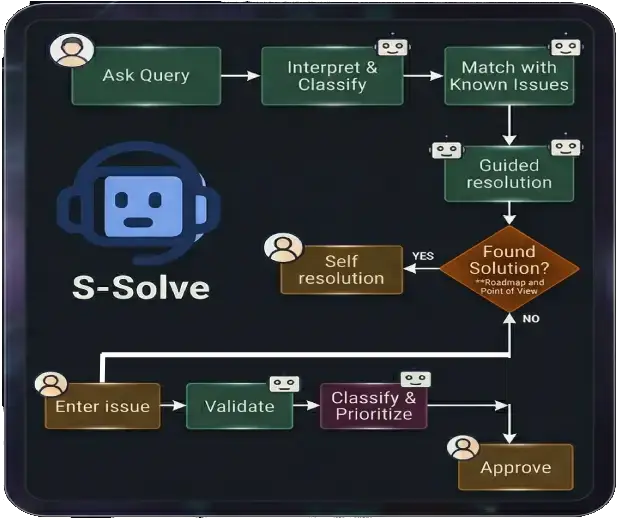
A dual-mode conversational assistant that helps business users get answers fast and helps IT/support teams retrieve knowledge, guide resolution, and support next-step action.
S-Solve is a conversational AI assistant designed to support two different but related user experiences. For business users, it helps answer frequent operational questions quickly and consistently. For IT and support teams, it helps retrieve knowledge, summarize incidents, guide resolution, and connect users to the right next action.
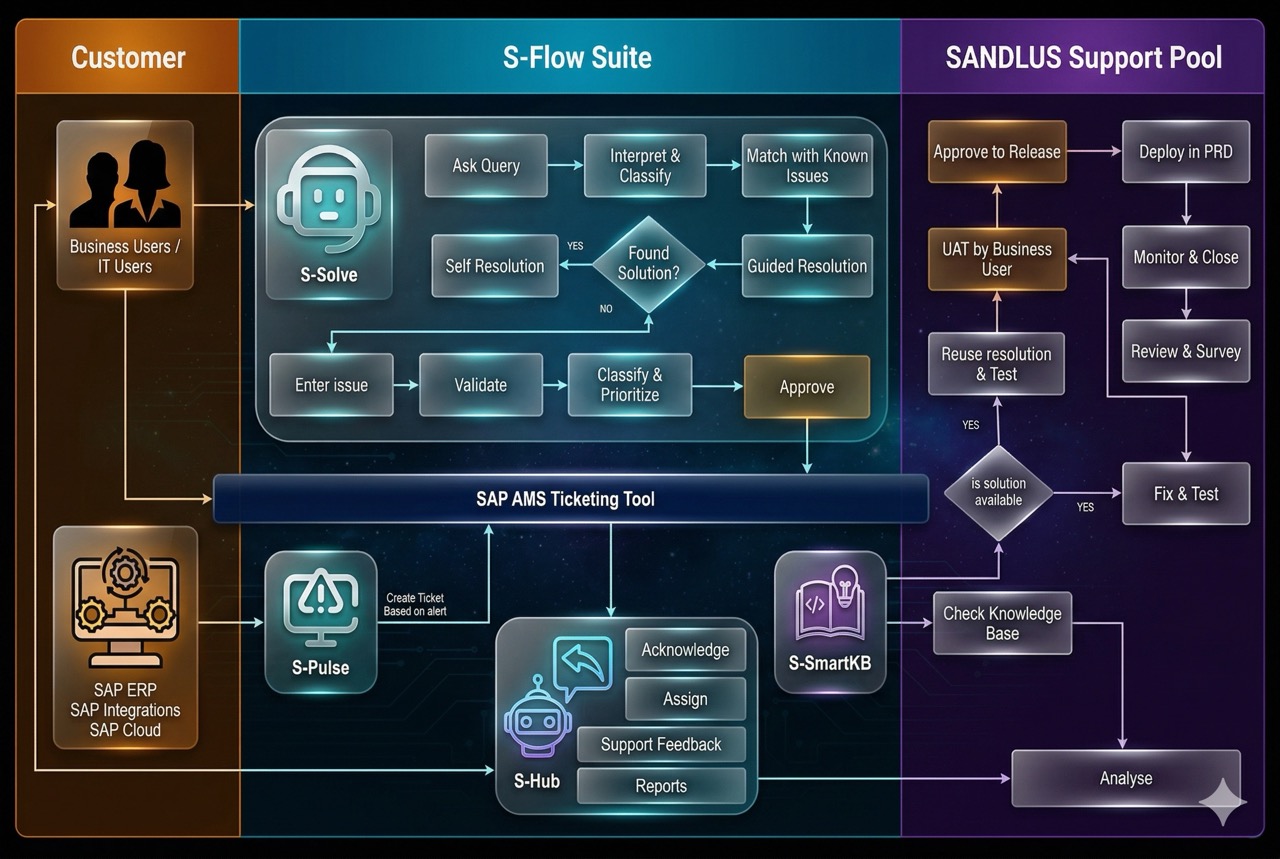

For users who need quick answers and simple actions without opening tickets or waiting on support.
order status; stock status; delivery status; invoice status; product information; reminders and notifications; approvals

For support teams who need faster access to trusted knowledge, clearer issue context, and more guided resolution support.
Incident summary; support knowledge retrieval; runbook and FAQ access; ServiceNow-linked support workflows; enterprise KB search; guided next-step action.
Handle high-volume repetitive requests such as order status, stock, delivery, invoice, and product questions.
Deliver instant responses at any time and scale to many questions in parallel with consistent quality.
Connect with SAP ERP and SAP S/4HANA to retrieve business data in response to user questions.
Draw from secure knowledge sources such as company-specific KBs, runbooks, FAQs, SAP knowledge, blogs, help forums, and internal repositories.
Support action-oriented workflows like creating orders, creating users, creating POs, resetting passwords, reminders, and approvals where applicable.
Extend the assistant across web portals, browser experiences, MS Teams, enterprise chatbot channels, and future multilingual support.



Support centers often struggle with a large volume of repetitive questions, limited staffing windows, and slow response times. S-Solve is designed to absorb repeated simple questions, deliver faster access to trusted information, and create a more scalable support experience for both business users and support teams.
Value points:

Analyze recurring support and business requests to determine which questions are frequent and straightforward enough for conversational handling.

Create dialog structures and train the assistant to recognize the request types and deliver appropriate responses.
Integrate the chatbot with SAP systems, support platforms, and trusted knowledge sources.

Where appropriate, guide next actions or hand users into the right support workflow.

Get instant help for common operational questions without waiting for service-center hours.

Reduce repetitive inbound requests and improve consistency of response.

Use the chatbot to retrieve secure knowledge, summarize issues, and support guided resolution.

Benefit from faster access to incident context, KB content, and runbook-driven troubleshooting.
S-Solve is an intelligent support assistant (chat-bot) for SAP environments. It helps users get faster answers, guided resolution steps, and more structured support interactions by drawing on incident history, knowledge content, and operational context.
Many SAP support teams spend too much time answering repeat questions, searching for past resolutions, and routing users through slow support processes. S-Solve helps make support more accessible, consistent, and efficient.
S-Solve is designed for both business users and IT support teams. Business users can use it to get quick help and guidance, while support teams can use it to speed up investigation, resolution, and knowledge reuse.
A standard chatbot often gives generic answers. S-Solve is designed for structured SAP support use cases, helping users access more relevant guidance, past resolution knowledge, and support-oriented next steps.
Business users can use S-Solve to ask support-related questions, understand common issues, get guided help, and find answers faster without always needing to wait for manual support intervention.
IT teams can use S-Solve to review likely resolutions, reference past incidents, improve consistency in handling repeat issues, and accelerate day-to-day support activities.
Enthusiastically disintermediate one-to-one leadership via business e-commerce. Dramatically reintermediate compelling process improvements rather than empowered relationships.